
WebFull list creation and management is in the WeGift iOS app ($2.99 starting November). This site is for joining a group and shopping from Android or a browser.

Free web companion

Join a WeGift group from any phone.

Android users (and anyone in a browser) can join an existing group, add wish-list ideas, edit their own items, and claim gifts — while surprises stay secret.

On this website

What you can do

  • Create a free account and sign in
  • Join an existing group with a code or invite link
  • Open wish lists in groups you’ve joined
  • Add, edit, and delete items on your own list in a group
  • Claim (and unclaim) gifts on other people’s lists
  • Open Shop links to buy a gift
  • Reset your password by email if you forget it
iPhone app · $2.99 starting November

What you’re missing

  • Create a new group
  • Create personal lists outside a group
  • Invite others / manage the join code as owner
  • Guest lists, themes, photos, and notifications
  • Claimed-gifts hub and “bought” tracking
  • Change password in account settings
  • Full list and group management

iPhone app

Themes, photos, and a richer list

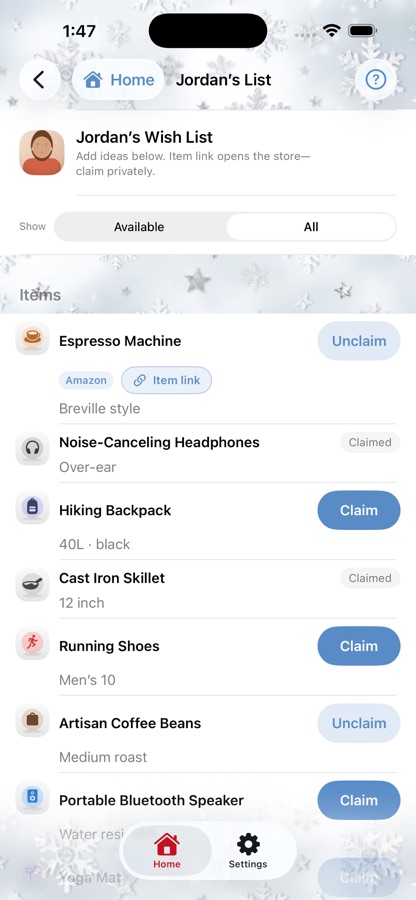
This site stays simple on purpose. On iPhone, wish lists get wallpapers, member photos, and the full WeGift look — $2.99 starting November.

WeGift iPhone app: a themed wish list with claim buttons
iPhone app

How it works

Someone with the iPhone app creates the group and shares a 10-character code or invite link.

You join on this site, add ideas to your list in that group, and claim gifts on other lists so nobody doubles up.

Want to start groups yourself? That’s in the WeGift iPhone app — $2.99 starting November.